Updates guide
ETS2 1.60 Update: Game Radio, Rest Changes and Job Details
A practical ETS2 1.60 update guide covering Game Radio, Job Details, GPS arrival estimates, expanded rest, improved materials, lights, and truck changes.
UpdatedJul 30, 2026
Read10 min
LevelBeginner
ByETS2Hub
Quick answer
ETS2 1.60 is the current stable release tracked by ETS2Hub. Its most useful player-facing changes are five built-in Game Radio stations, an expanded F6 Job Details widget, GPS arrival estimates, selectable rest times, separate rest and mandatory-break indicators, improved materials on selected trucks, lighting adjustments, and new Volvo FH Series 6 aero parts.
Euro Truck Simulator 2 1.60 is the current stable release tracked by ETS2Hub, officially released on June 18, 2026. The update is larger than a list of cosmetic tweaks: it changes how you listen to music, read a delivery, estimate arrival time, and plan sleep.
This guide explains what those changes mean while playing. For a version-only answer, see What Is the Latest ETS2 Version?. SCS has also opened a separate 1.61 Experimental Beta, but its unfinished UI work is not part of the stable 1.60 experience.
The 1.60 Changes That Matter Most
| Feature | What Changed | What You Should Do |
|---|---|---|
| Game Radio | Five built-in themed stations | Open the F6 widget and choose a station without editing stream files |
| Job Details | Cargo, weight, destination, income, and remaining time are easier to inspect | Check the panel before rest, fuel, or route decisions |
| GPS arrival data | Estimated arrival day/time, travel time, and distance are visible | Compare ETA with the delivery window before accepting risk |
| Expanded rest | Select a sleep/wake option and distinguish rest state from mandatory break | Plan a full rest before the driving limit expires |
| Improved materials | Selected DAF and MAN trucks received the first visual material pass | Recheck scaling, lighting, and performance before raising settings |
| Lighting and vehicles | Lighting adjustments and Volvo FH Series 6 aero parts | Review visual settings and the truck configurator |
Game Radio: Five Stations Without Stream Editing
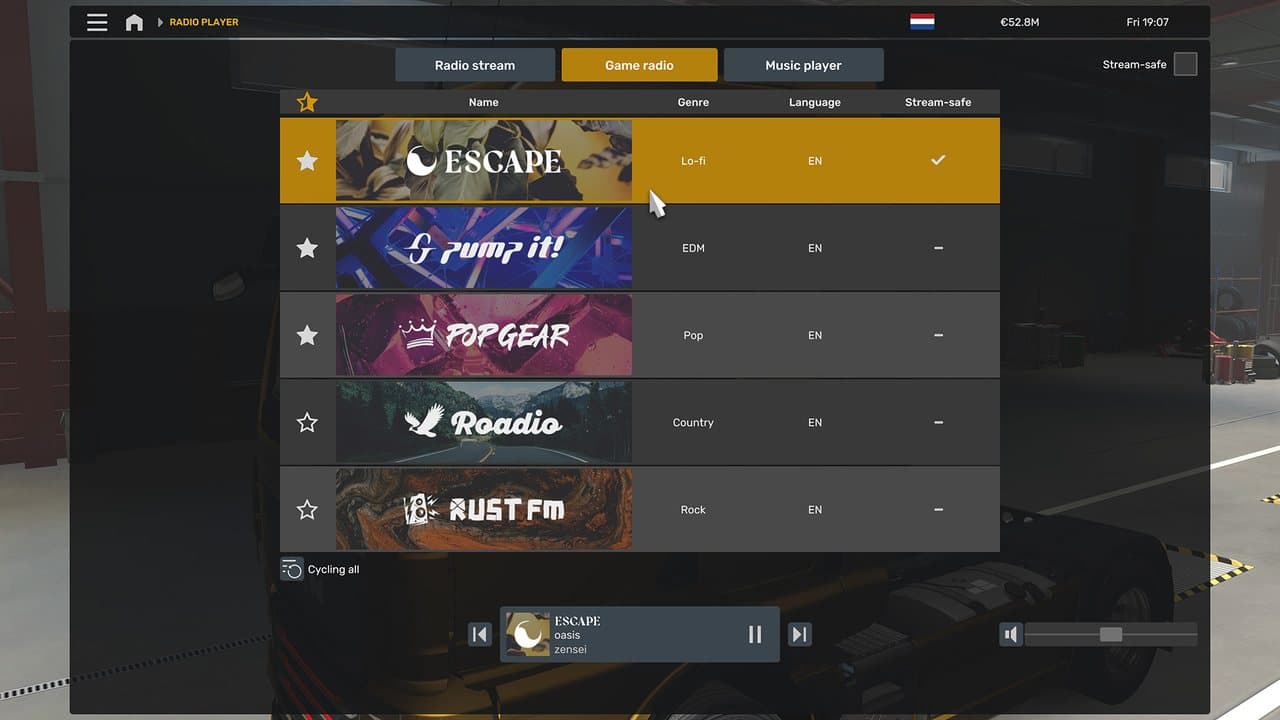
Game Radio adds five SCS-produced stations:
- Rust FM — rock.
- Escape — ambient and electronic.
- PUMP IT! — high-energy dance music.
- Pop Gear — pop.
- Roadio — country.
Open the F6 widget, switch to the radio options, and choose a station. This feature is separate from internet radio and custom live_streams.sii entries: Game Radio works as an official in-game catalogue, while custom streams still depend on external URLs and station availability.
Use the complete ETS2 Game Radio Guide for controls, station choice, and no-sound troubleshooting. Advanced users can continue to the Custom Radio Streams Guide.
Job Details and GPS Arrival Estimates
The expanded Job Details view gives you the practical information needed to protect a delivery:
- Cargo type and weight.
- Delivery destination.
- Expected income.
- Remaining delivery time.
- Route progress.
The GPS now also shows an estimated arrival day and time, remaining travel time, and remaining distance. Read the two displays together: Job Details tells you what the contract allows, while the GPS tells you what the current route predicts.
That distinction matters when the route includes a ferry, city traffic, a long pickup, a fuel stop, or mandatory rest. An ETA inside the delivery window is useful; an ETA that leaves only a few minutes of margin is a warning to rest or reroute before the situation becomes urgent.
Read ETS2 Job Details Widget Guide for the full workflow and ETS2 Late Delivery Guide if the deadline is already at risk.
Expanded Rest: 10 Hours Driving, 9 Hours Rest
In ETS2, a player can drive for up to 10 hours before a continuous 9-hour mandatory rest is required. Version 1.60 makes the planning clearer:
- The rest interaction offers sleep/wake timing choices.
- Rest State uses the bed indicator.
- Mandatory Break uses the
Pindicator. - The two states no longer have to be treated as the same piece of information.
The safest habit is to inspect fatigue, delivery time, fuel, and the next bed icon before a long job. Do not wait until the warning becomes urgent on a remote road. The detailed How to Sleep and Rest in ETS2 page explains triggers, wake-time choices, and common problems.
Improved Materials: What It Does and Does Not Mean
The improved material system starts with selected vehicles, including the DAF New Generation DAF and MAN TG3 TGX families. It is a gradual rollout, not an instant replacement of every truck, trailer, road, and building material.
The goal is more believable surface response under different light: paint, plastics, metals, and rough surfaces can react more consistently. Because the rollout is selective, compare the same truck and lighting conditions before deciding that a graphics option changed performance.
If 1.60 looks softer, darker, or slower on your PC, start with ETS2 Graphics and Performance Settings and adjust scaling, mirrors, shadows, and lighting one group at a time.
Smaller Vehicle and Lighting Changes
Version 1.60 also includes lighting adjustments and aerodynamic accessories for the Volvo FH Series 6. These are worthwhile for owners of the truck, but they do not require a separate update strategy.
After updating:
- Load a clean profile first.
- Check the truck configurator for new parts.
- Drive a short daylight and night route.
- Confirm mirrors, dashboard lighting, and performance.
- Re-enable mods in small groups.
Safe Update Checklist for Modded Profiles
- Back up your ETS2 profile and saves.
- Record your active mod list and load order.
- Update ETS2 through Steam on the normal branch.
- Start a clean vanilla profile.
- Test a short quick job.
- Add map, truck, traffic, economy, UI, and sound mods back gradually.
- Read Mods Not Working After an ETS2 Update before forcing an old mod to load.
Official Source and Verification
This page was last verified on July 30, 2026 against SCS Software's ETS2 1.60 release notes. Use the ETS2 Roadmap for released, experimental, announced, and TBA status in one place.
Read next
Continue through the next task instead of jumping to a random tag page.
UpdatesWhat Is the Latest ETS2 Version?
The current stable ETS2 version, the optional experimental branch, how to check your build, and which version normal and modded players should use.
SetupETS2 Game Radio Guide: Stations, Controls and No-Sound Fixes
How to use the five built-in ETS2 Game Radio stations in 1.60, choose a station, control playback, and fix common no-sound problems.
 Beginner
How to Sleep and Rest in ETS2
How to sleep in ETS2 1.60, use the wake-time selector, understand the 10-hour driving and 9-hour rest rule, and fix missing rest prompts.